07: SALTRO Planner
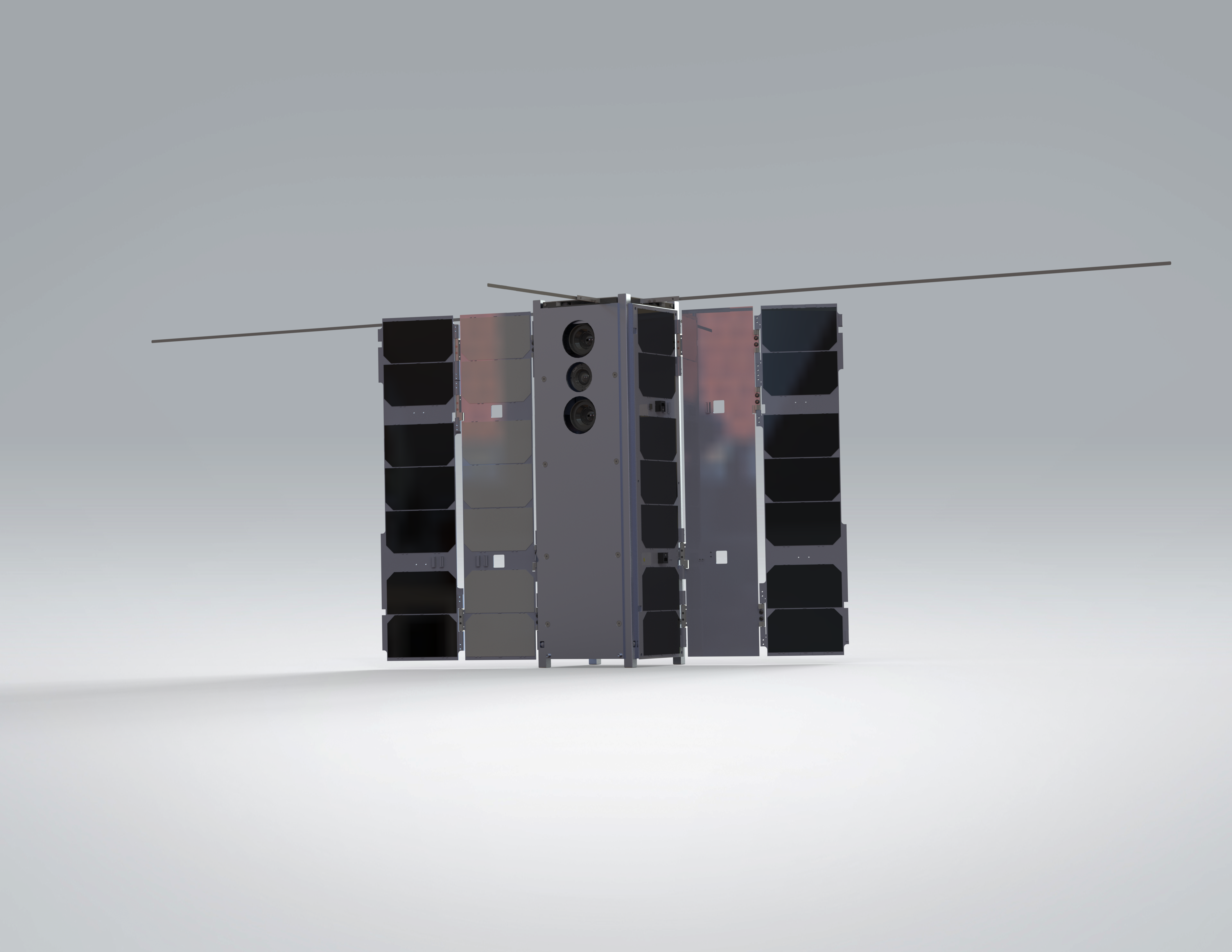
This tutorial uses SALTRO on a BeaverCube 2 (3+1) pointing task aligned with Tutorial 06. The control problem remains extremely difficult: 3 MTQ + 1 RW actuation with aggressive retargeting requirements.
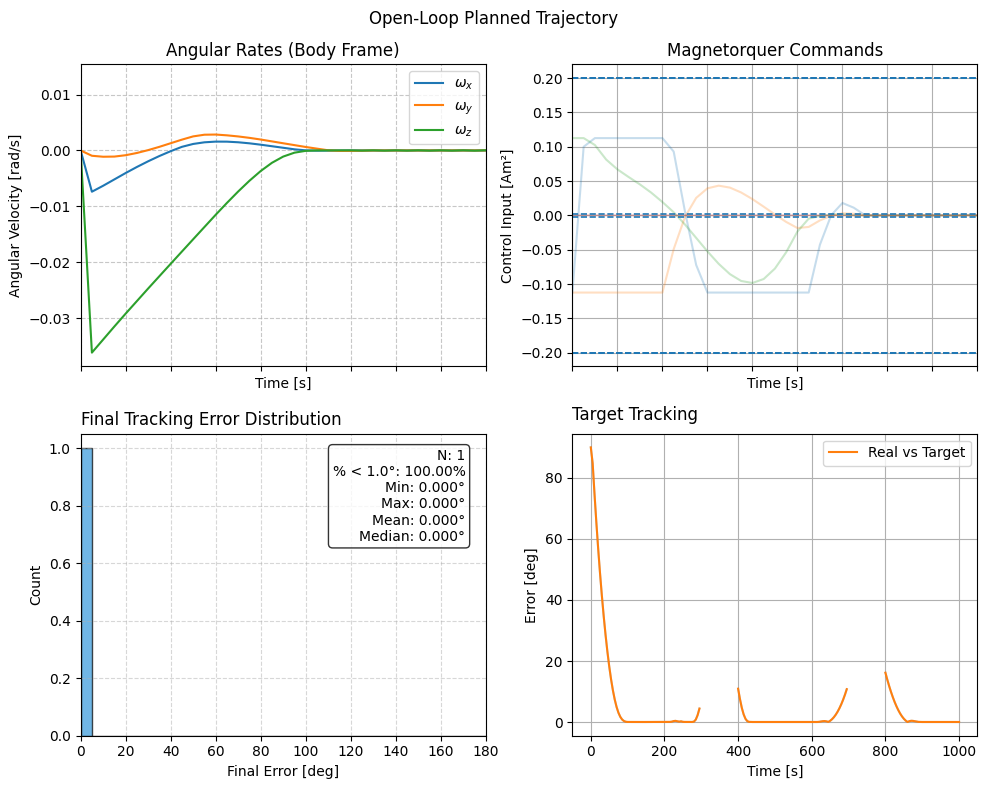
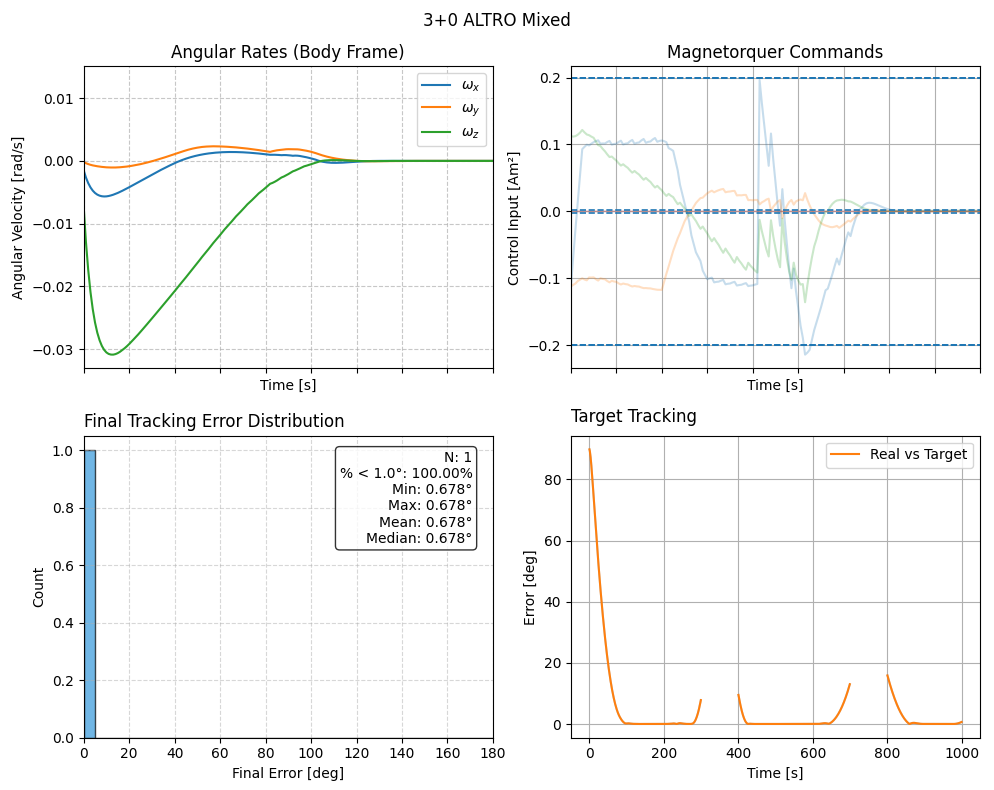
Compared with the Plan-and-Track trajectory planner, SALTRO is typically much faster. The tradeoff is that SALTRO does not assume the same level of perfect field knowledge, so you should expect differences in tracking quality depending on scenario and tuning.
A trajectory planner computes a feasible, optimized reference trajectory that the spacecraft can track while satisfying actuator limits and pointing objectives.
For more details on SALTRO methods, see the SALTRO documentation website.
Component |
Description |
|---|---|
Satellite |
BeaverCube 2 (3+1) generated from the built-in satellite factory. |
Actuation |
3 MTQ + 1 RW attitude control with aggressive magnetic-only retargeting constraints. |
Controller |
SALTRO planner/tracker with default SALTRO planner settings. |
Goal Sequence |
Piecewise inertial goals with no-goal interval between retargeting segments. |
Orbit |
Circular-like LEO test orbit initialized from position and velocity vectors. |
import os
import sys
sys.path.append(os.path.abspath(os.path.join(__file__, "../../..")))
import ADCS as ADCS
import numpy as np
import matplotlib.pyplot as plt

satellite = ADCS.satellite_factory.create_beavercube2_cubesat()

x_0 = ADCS.State.from_array(np.array([0, 0, 0] + [1, 0, 0, 0] + [0.0])) # w, q, h

planner_settings = ADCS.controller.saltro.PlannerSettings(est_sat=satellite)
controller = ADCS.controller.SALTRO(est_sat=satellite, planner_settings=planner_settings)

os0 = ADCS.Orbital_State(ephem=ADCS.Ephemeris(), J2000=0.22, R=np.array([5000, 0, 5000]), V=np.array([0, 7.5, 0]))
goal_timeline = {0.0: ADCS.goals.ECI_Goal(np.array([1, 0, 0])), 300.0: ADCS.goals.No_Goal(), 400.0: ADCS.goals.ECI_Goal(np.array([0, 1, 0])), 700.0: ADCS.goals.No_Goal(), 800.0: ADCS.goals.ECI_Goal(np.array([0, 0, 1]))}
goallist = ADCS.GoalList(goal_timeline=goal_timeline, time_units="seconds", start_juliantime=0.22)

results = ADCS.simulate(
    x=x_0,
    satellite=satellite,
    controller=controller,
    goal=goallist,
    os0=os0,
    dt=1.0,
    tf=1000.0
)

ADCS.plot(
    results,
    ADCS.plots.AnimationPlot(),
    layout=(1,1),
    title="3+1 SALTRO Reduced",
)

ADCS.plot(
    results,
    ADCS.plots.AttitudePlot(sources=["real", "reference"]),
    layout=(1,1),
    title="3+1 SALTRO Mixed",
)

ADCS.plot(
    results,
    ADCS.plots.AngularVelocityPlotCombined(sources=["real"]),
    ADCS.plots.ControlPlotCombined(title="Magnetorquer Commands", units="Am²"),
    ADCS.plots.TargetHistogram(bin_width=5.0),
    ADCS.plots.TargetPlot(modes=["real_target"], title="Target Tracking"),
    layout=(2,2),
    title="3+1 SALTRO Mixed",
)

ADCS.plot(
    results,
    ADCS.plots.ControlPlotSingle(index=0, title="Magnetorquer 1", units="Am²"),
    ADCS.plots.ControlPlotSingle(index=1, title="Magnetorquer 2", units="Am²"),
    ADCS.plots.ControlPlotSingle(index=2, title="Magnetorquer 3", units="Am²"),
    layout=(3,1),
    title="3+1 SALTRO Mixed",
)

plt.show()
In practice, SALTRO provides a strong speed-accuracy tradeoff for hard magnetic-only pointing tasks and is often preferred when fast replanning is required.
Simulation Results
|
|
How To Run
Install and build prerequisites:
If the SALTRO folder is missing, clone recursively:
git clone --recursive https://github.com/nscheuer/Generalized_ADCS.git
Then run:
python examples/tutorials/tutorial_7_SALTRO.py